
A more personal sleep system
The most sophisticated sleep app should do more than score your sleep.
SleepSpace connects the things that shape your night: your schedule, personal sounds, movement, wearable data, overnight disruptions, and the small decisions that make tomorrow's sleep easier.
We built SleepSpace to be the most sophisticated sleep app on the planet because a sleep score by itself is not a plan. A useful sleep app helps you understand your pattern, choose a realistic experiment, and return with feedback that makes the next night better.
New on iPhone
My SoundsChoose private audio from your Files for Wind Down, sound masking, or wake-up.
New circadian context
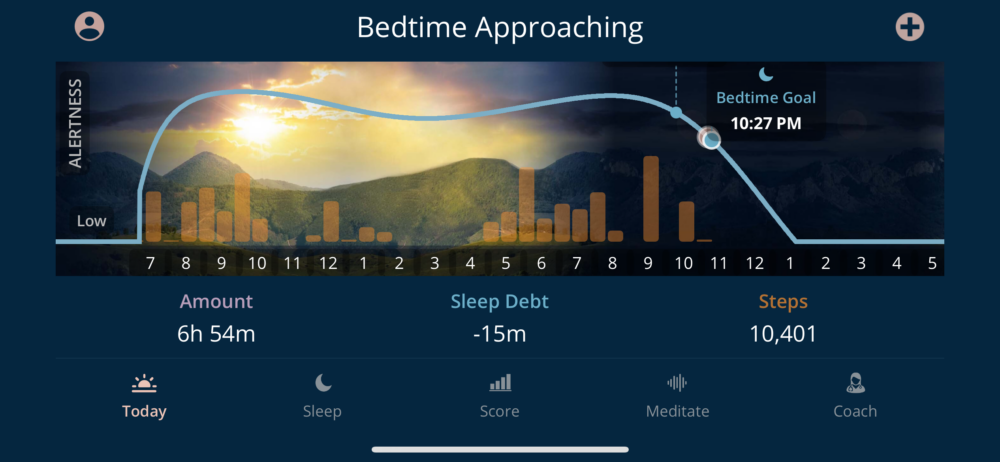
StepsSee steps from calculated bedtime through now alongside your timing plan when Health data are available.
The goal
One next stepUse the data to make tonight's routine easier to repeat, not to chase a perfect score.
What is new
Your personal audio belongs in your sleep routine.
On iPhone, My Sounds lets you add audio from Files and select it wherever it makes sense: before bed, through the night, or at wake-up. That may mean a relaxation you already love, a personal hypnosis recording, a familiar soundscape, or a morning cue that works better than a generic alarm.
Supported audio types include M4A, MP3, WAV, AIFF, and CAF up to 100 MB. The file is copied to a private, on-device library. SleepSpace does not need to turn a personal recording into an uploaded sleep product for it to be useful.
This is personalization in the practical sense: use the cue you are most likely to return to, then see what changes in your sleep routine and morning feedback.
More than a line chart
Your circadian rhythm is a live plan, not a lecture.
The SleepSpace chart visualizes your timing model through the day and puts the evening question in front of you: when should you begin coming down?
Timing
See the shape of the day
Follow alertness timing, bedtime goals, wake timing, and sleep debt in one view. The chart is designed to make your next timing decision more obvious.
Movement context
See your steps beside the plan
When Health data are available, steps from calculated bedtime through the current time appear in the chart. It is context for your day, not a moral scorecard.
Personal feedback
Use the evening cue
Pair the chart with your ideal schedule, Smart Alarm settings, and Wind Down. Better timing is easier when the app gives you a cue you can act on.
Learn more
Understand circadian timing
Read the SleepSpace guide to circadian rhythm and why alertness changes through the day.
SleepSpace is not built as a passive tracker. It is a connected sleep/wake loop: prepare for sleep, run the night, understand what happened, and make one smarter decision tomorrow.
A night you can inspect
See the precise moments SleepSpace played a sound.
The morning report is designed to make the overnight sound environment transparent. Instead of simply showing that sounds were enabled, SleepSpace can visualize when they happened alongside the changing sound level in your room.
In the Sound in Room view, a timeline places overnight room sound in context with clearly marked interventions: the start of a pre-sleep sound, the moment Deep Sleep Stimulation was played, and the time Dream Enhancer was activated. You can also see potential sound disruptions, including snoring, on the same night-level view.
See the exact time your chosen pre-sleep sound started, whether it was a SleepSpace track or a private sound selected from Files on iPhone.
See when stage-targeted sound was used during the night, so the intervention is visible rather than a black box.
See the timing of Dream Enhancer activation and relate it to the cues or intentions you set before bed.
Review room-noise events, potential snoring, and other disruptions. When recording is enabled, replay a sound event from the morning report.
Tracking is useful. Transparent intervention is better.
When you can see what was happening in the bedroom and what SleepSpace did in response, the next experiment becomes more concrete. Did your sound environment become disruptive at a particular time? Did a SleepSpace sound play when expected? Were there events you want to replay or discuss with a clinician?
This is not a diagnostic record, and a sound event is not a medical conclusion. It is a practical way to connect your overnight context with the feedback you receive the next morning.
The complete system
Recent SleepSpace updates are designed to work together.
Track and understand
Score, diary, weekly and monthly analysis
Move beyond one number with context about your patterns, ideal schedule, sleep debt, and personalized feedback informed by thousands of published papers. Understand the SleepSpace Score.
See disruptions
Sound tracking and Snore Tracker
Review room sound, potential disruptions, and sound events in the morning. A precise visual timeline shows when pre-sleep audio, Deep Sleep Stimulation, and Dream Enhancer played beside the sound environment. When enabled, replay recorded sound events. Learn about Snore Tracker.
Change the night
Wind Down, relaxation, sounds, and haptics
Use guided relaxation, breathwork, sleep sounds, and gentle vibration cues to create a repeatable pre-sleep routine. These are wellness tools, not medical treatment. Explore guided breathing and the Sleep Vibration app.
Change the morning
Smart Alarm and wake settings
Build a more deliberate wake-up routine around a wake target, ramp-up, snooze behavior, sound, and timing. Learn about Smart Alarm.
Bring your data
Wearable and Health integration
Use available wearable and Health data as additional context for personalized feedback, schedule support, and your broader sleep pattern. The app is designed to interpret trends calmly, not claim absolute truth. Learn how SleepSpace works with wearables.
Ask a question
Dr. Snooze and guided programs
Ask sleep questions, work through app-based programs, and turn an abstract recommendation into a small behavior you can try tonight. Meet Dr. Snooze. SleepSpace does not replace a clinician or clinician-delivered therapy.
From information to action
SleepSpace is built to close the loop around your own sleep.
The point of adding more data is not to create a busier dashboard. It is to make the next decision more personal, more practical, and easier to repeat.
1. Build your picture
Use more than one source of truth
SleepSpace can bring together phone-based sleep sessions, diary context, sound environment, available Health and wearable data, and your schedule. That matters because a single number rarely explains why a night felt good or difficult.
Wearables such as Apple Watch, Oura, and WHOOP can add useful context when available. SleepSpace treats them as trend information to interpret thoughtfully, not a claim of absolute sleep-stage truth. Explore wearable integration.
2. Find the pattern
Move from a day score to weekly and monthly analysis
The day view helps you revisit one night. Weekly and monthly analysis help you see the pattern behind it: sleep timing, sleep debt, consistency, diary context, and the relationship between the plan and the reality of your life.
That longer view can produce an ideal schedule and a personalized sleep phenotype, including one of SleepSpace's 70 sleep animals. The animal is a memorable way to think about your pattern, not a diagnosis or a fixed identity. Discover the Sleep Pyramid and sleep animals.
3. Choose a next step
Get feedback that is concrete enough to try
SleepSpace feedback is informed by thousands of peer-reviewed publications, then translated into a usable next step: shift your wind-down window, protect a wake time, try a relaxation, review a disruption, adjust a Smart Alarm setting, or use a different sound cue.
The point is not to prescribe a perfect night. It is to run a smaller, calmer experiment that fits your life.
4. Ask when you are stuck
Use Dr. Snooze as a sleep-science guide
Dr. Snooze lets you ask practical questions about sleep, routines, timing, and even dreams. It is there to help make the app's feedback understandable and useful in the moment, whether you are deciding how to wind down or trying to understand a pattern in your data. Learn more about Dr. Snooze.
It is not a doctor, does not diagnose, and should not replace care from a qualified clinician.
What you can do tonight
Choose the part of the sleep/wake loop that needs help.
Before bed
Start a Wind Down that fits you
Set a target bedtime, begin your Wind Down, then choose the support that is easiest to return to: a SleepSpace relaxation, guided breathing, a vibration cue, a familiar soundscape, or a private audio file selected from Files on iPhone.
For users working on insomnia symptoms, SleepSpace's programs are informed by principles used in cognitive behavioral therapy for insomnia. They are not actual CBT-I or a replacement for clinician-guided care. Learn about the CBT-I-informed approach.
During the night
Run a more responsive session
SleepSpace can record the sound environment, track potential disruptions, play selected sounds, and make the timing of overnight sound features visible in the morning. Deep Sleep Stimulation and Dream Enhancer are designed as sleep-wellness features, not treatment for a disorder.
The goal is to help the user understand both the bedroom environment and the support they chose to run overnight.
When you wake
Make the transition more deliberate
Wake timing is part of sleep optimization. Smart Alarm brings together a wake target, gradual ramp-up, selected sound, vibration support where available, snooze behavior, and the broader ideal schedule so the morning feels like part of the plan rather than an interruption to it.
The next morning
Review without turning sleep into a test
Open the Score, check your sound and timing context, replay a relevant sound event if available, add diary details, and choose one next step. SleepSpace is designed to reduce confusion, not create orthosomnia or anxiety about every imperfect metric.
Guided sleep programs
More than a library of sleep content: choose a path and practice it.
SleepSpace programs turn a broad goal such as falling asleep, building deeper sleep habits, or managing the routine around CPAP into short, trackable daily steps. Your active program can surface learning tasks, check-ins, and relevant tools inside Coach and Today.
Fall Asleep & Stay Asleep
A six-week, CBT-I-informed sleep-improvement path
This program uses behavioral sleep education and cognitive-behavioral strategies to help users relax the mind at night, strengthen the association between bed and sleep, build a more regular schedule, and understand sleep efficiency.
It includes daily premium educational content, guided tasks, surveys, circadian reminders, and resources for falling and staying asleep. It is informed by cognitive behavioral therapy for insomnia principles; it is not clinician-delivered CBT-I, diagnosis, or medical treatment.
Journey to Deeper Sleep
Build the conditions that make deeper sleep more likely
This guided path focuses on the repeatable parts of the night: a wind-down routine, schedule consistency, the sound environment, tracking context, and morning review. It is designed for people who want to move beyond generic tips and test what helps their own sleep feel more restorative.
Use it with SleepSpace's relaxation tools, Wind Down timing, sound features, daily Score, and longer-term analysis. The program does not promise to increase a specific sleep stage or treat a sleep disorder; it gives you a structured way to practice sleep-supporting behavior.
Navigating CPAP
Bring the sleep routine around treatment into one place
For eligible users, Navigating CPAP gives structure to the behavioral side of living with PAP therapy: maintaining a dependable sleep/wake routine, noting comfort or sleep-quality context, completing guided learning tasks, and arriving better prepared for a conversation with a clinician.
SleepSpace does not change CPAP pressure, replace a sleep physician, or make treatment decisions. The program is a supportive routine and education layer around prescribed care.
Breath health
Understand the overnight breathing context
For people concerned about snoring, sound disruptions, or breathing-related sleep issues, SleepSpace can combine sound tracking, morning playback where available, symptom context, and educational next steps. This can help a user prepare a clearer story for a clinician without turning the app into a diagnostic device.
Programs now connect to the daily experience.
Recent app work makes the program experience more concrete. Instead of enrolling and losing a course in a separate area of the app, your active plan can show its current name, description, clinician context where applicable, learning tasks, and daily actions in Coach and Today.
Complete a task, review the night, add diary context, and return to the next program step. The course becomes part of the sleep/wake loop instead of another tab you mean to open later.
One system, two platforms
iPhone and Android are moving forward together.
Recent iPhone work includes steps in the circadian view, personal audio from Files, sound-environment improvements, deeper Score analysis, Smart Alarm refinement, and haptic relaxation. The latest Android release brings a fuller circadian chart and coaching experience, meditations, haptics, tasks, stronger sound/session reliability, and closer functional parity with iPhone.
Some features depend on your phone, connected wearable, permissions, and current release. Update the app before your next session so you can use the newest version available to you.
Continue exploring
Go deeper into the part of sleep you want to improve.
Sleep is not one feature. Use these SleepSpace guides to understand the signal, find a practical tool, and decide what you want to try next.
Your nightly feedback
Understand your Sleep Score
Learn what goes into the Score and how to use it as a next-day feedback tool rather than a verdict on your sleep.
Timing and alertness
Explore circadian rhythm
Understand the daily timing signals behind the alertness chart, bedtime cue, ideal schedule, and sleep/wake consistency.
Your sound environment
Track snoring and disruptions
Learn how the morning sound report can help you review potential snoring and other room-sound events in context.
Overnight sound support
Learn about deeper-sleep tools
See how SleepSpace approaches the timing, transparency, and wellness context around Deep Sleep Stimulation.
Body-based wind down
Try guided breathing
Use a paced breathing practice when you want a simple physical cue to slow down before bed.
Sleep behavior support
See the CBT-I-informed approach
Learn how SleepSpace translates behavioral sleep principles into app-based education, routines, and guided practice without presenting itself as clinician-delivered CBT-I.
Bring your own data
Connect wearable context
Learn how wearable information can add useful context to your patterns without becoming a claim of absolute sleep-stage truth.
Personalized questions
Ask Dr. Snooze
See how SleepSpace's always-available sleep guide can help you interpret routines, timing, feedback, and questions that come up in real life.
Your longer pattern
Find your sleep animal
Explore the Sleep Pyramid and the 70 sleep-animal phenotypes designed to make a longer-term pattern more understandable and memorable.
A better morning
Use a Smart Alarm
Learn how a wake target, ramp-up, sound choice, and a consistent routine can make waking feel more intentional.
Questions people ask
Can I use a personal hypnosis or relaxation track?
On iPhone, you can import supported audio from Files and choose it for Wind Down, sound masking, or wake-up. It can support a personal wellness routine, but it is not a substitute for medical or mental-health care.
Do steps change my circadian rhythm?
Steps are displayed as useful context around your timing plan. SleepSpace does not claim that a step total alone determines your circadian rhythm; it helps you see your movement alongside sleep debt, alertness timing, and bedtime goals.
What should I do first?
Update SleepSpace, choose one wind-down or wake-up cue, and run the same simple routine for a few nights. The goal is not perfect tracking. It is one useful pattern and one better decision.
Try the full feedback loop tonight. Update SleepSpace, set one personal sound or Wind Down cue, review your circadian timing, and see what your own data teaches you tomorrow.
SleepSpace provides wellness, education, and sleep-behavior support. It does not diagnose, treat, cure, or prevent disease and is not a replacement for clinician-delivered care.